Kullanıcı veya servis hesaplarında yapılan bir yetki hatası, kapatılması gereken bir network servisinin açık bırakılması, istemcilere Domain Administrator hesabıyla giriş yapan bir sistem yöneticisi veya zamanında geçilmeyen bir güvenlik yaması gibi hususlar Active Directory sisteminin istismar edilmesi noktasında saldırganların elini güçlendiren konulardan sadece birkaçı olarak sayılabilir. Dolayısıyla, Active Directory ortamında gerçekleştirilen işlemlerin düzenli olarak izlenmesinin ve loglanmasının önemi yadsınamaz bir gerçek. Yazı kapsamında Powershell ile Active Directory ortamında bazı kontroller gerçekleştirecek, toplanması gereken logları, kapatılması gereken servisleri inceleyecek ve son olarak kullanıcı ve bilgisayar hesaplarında bazı anomalilerin üzerinden geçeceğiz.
Scripti çalıştırdıktan sonra kullandığınız SIEM veya Active Directory üzerindeki anomalileri takip eden bir uygulama üzerinden bol miktarda alarm almanızın olası olduğunu hatırlatmak isterim. Konuyu örneklemek gerekirse, satış departmanında yer alan bir istemcinin aşağıdaki satırda geçen Active Directory Forest’ına ait Global Catalog bilgisini sorgulaması çok olası değil.
[System.DirectoryServices.ActiveDirectory.Forest]::GetCurrentForest().GlobalCatalogsPowershell loglarının toplanması ve SIEM’e gönderilmesi oldukça önemli olduğuna değindikten sonra konuyla ilgili daha önce yazdığım yazıya bu bağlantıdan erişip inceleyebilirsiniz. Peki, anomali ve SIEM konusunu bir kenara bırakıp yazıya devam edelim. Aşağıda paylaştığım Powershell komutlarını Windows Server 2016 üzerinde yüklü Domain Controller rolü bulunan bir sunucuda gerçekleştirdiğimi bildirmek isterim. Ayrıca, testlerinizi canlı ortamda yapmadan önce mutlaka lab. ortamınızda gerçekleştirmenizi ısrarla tavsiye ediyorum.
Yazının konusu olan Powershell scriptine bu bağlantıdan erişebilirsiniz. Script kapsamında raporunu oluşturacağımız başlıklar aşağıdaki şekilde:
- Active Directory ortamıyla ilgili temel bilgiler,
- Kullanıcı raporu,
- Bilgisayar raporu,
- Toplanması gereken loglar raporu,
- Kapatılması uygun olan sunucu servisleri raporu.
Scripti çalıştıralım.
mkdir adReports
cd adReports
powershell "IEX(New-Object Net.WebClient).downloadString('https://raw.githubusercontent.com/kaptankojiro/activedirectorybasicsecuritychecks/main/ad_sec_test.ps1')"
Sonrasında sonuçları hızlı bir şekilde inceleyelim. Domain hakkındaki genel bilgiler ekranı:
- Active Directory Domain
- Forest
- Trust
- Global Catalogs
- Domain Policy
- Shadow Copy Writers
$adDomain = Get-ADDomain
$dc = Get-ADDomainController
$forest = Get-ADForest
$trust= Get-ADTrust -Filter *
$forestGlobalCatalogs = [System.DirectoryServices.ActiveDirectory.Forest]::GetCurrentForest().GlobalCatalogs
$domainPolicy = Get-WmiObject -Namespace root\directory\ldap -Class ds_domain | select ds_lockoutduration, ds_lockoutobservationwindow, ds_lockoutthreshold, ds_maxpwdage, ds_minpwdage, ds_minpwdlength, ds_pwdhistorylength, ds_pwdproperties
$share = Get-WmiObject -Class win32_share -list | fl
$patches = Get-WmiObject -Class win32_quickfixengineering
$shadow = vssadmin list writers | Select-String "writer name" 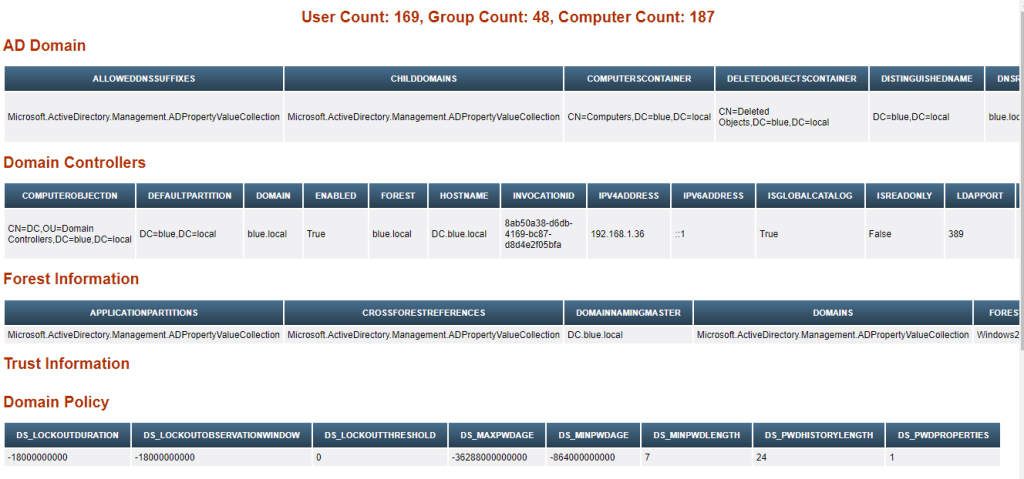
Kullanıcı raporu ekranı:
- krbtgt hesabı bilgileri
- Sadece DES şifreleme ile login olan kullanıcılar (UseDESKeyOnly)
- Parolasında geri çevrilebilir şifreleme olan kullanıcılar (AllowReversiblePasswordEncryption)
- Parolası sürekli geçerli olan kullanıcılar
- SPN hesapları
- Admin hesapları
- Diğer 16 farklı rapor
$krbtgt = Get-ADUser krbtgt -Properties Created, PasswordLastSet, Enabled, SID | select Created, PasswordLastSet, Enabled, SID
$useDESkeyOnly = Get-aduser -filter * -properties Name, UseDESKeyOnly | where {$_.UseDESKeyOnly -eq "true" }  | select name,enabled, distinguishedName,LastLogonDate,UseDESKeyOnly
$allowReversibleEnc = Get-aduser -filter * -properties Name, AllowReversiblePasswordEncryption     | where {$_.AllowReversiblePasswordEncryption       -eq "true" }   | select name,enabled, distinguishedName,LastLogonDate,AllowReversiblePasswordEncryption
$accountNotDelegated= Get-aduser -filter * -properties Name, AccountNotDelegated | where {$_.AccountNotDelegated   -eq "true" }   | select name,enabled, distinguishedName,LastLogonDate,AccountNotDelegated
$passwordNeverExpires = get-aduser -filter * -properties Name, PasswordNeverExpires | where {$_.passwordNeverExpires -eq "true" }   | select name,enabled, distinguishedName,LastLogonDate,PasswordNeverExpires
$cannotChangePassword = get-aduser -filter * -properties Name, CannotChangePassword | where {$_.CannotChangePassword -eq "true" }  | select name,enabled, distinguishedName,LastLogonDate,CannotChangePassword
$disabledAccounts =   Get-aduser -filter * -properties Name | where {$_.enabled -eq "false" }   | select name,enabled, distinguishedName,LastLogonDate
$inactiveAccounts= Get-ADUser -Filter * -Properties * | Where { ($_.LastLogonDate -le $LastLoggedOnDate) -AND ($_.PasswordLastSet -le $PasswordStaleDate) } | select-object name,enabled, distinguishedName,LastLogonDate,passwordlastset  |
$kerberosPreAuth = Get-ADUser -Filter {DoesNotRequirePreAuth -eq $true} | select name,enabled, distinguishedName,LastLogonDate
$lockedAccounts = Search-ADAccount -LockedOut  | select name,enabled, distinguishedName,LastLogonDate
$adPolicy = Get-ADDefaultDomainPasswordPolicy
$spn = get-aduser -filter {(objectclass -eq 'user')} -property serviceprincipalname | where-Object {$PSItem.ServicePrincipalName -ne $null}
$enterpriseAdmins = Get-ADGroupMember "Enterprise Admins" | Get-AdUser -Property LastLogonDate | select name,enabled, distinguishedName,LastLogonDate,passwordlastset
$domainAdmins = Get-ADGroupMember "Domain Admins" | Get-AdUser -Property LastLogonDate | select name,enabled, distinguishedName,LastLogonDate,passwordlastset
$schemaAdmins = Get-ADGroupMember "Schema Admins" | Get-AdUser -Property LastLogonDate | select name,enabled, distinguishedName,LastLogonDate,passwordlastset
$accountOperators = Get-ADGroupMember "Account Operators" | Get-AdUser -Property LastLogonDate | select name,enabled, distinguishedName,LastLogonDate,passwordlastset
$serverOperators = Get-ADGroupMember "Server Operators" | Get-AdUser -Property LastLogonDate | select name,enabled, distinguishedName,LastLogonDate,passwordlastset
$gpCreatorOwners = Get-ADGroupMember "Group Policy Creator Owners" | Get-AdUser -Property LastLogonDate | select name,enabled, distinguishedName,LastLogonDate,passwordlastset
$dnsAdmins = Get-ADGroupMember "DNSAdmins" | Get-AdUser -Property LastLogonDate | select name,enabled, distinguishedName,LastLogonDate,passwordlastset
$enterpriseKeyAdmins = Get-ADGroupMember "Enterprise Key Admins" | Get-AdUser -Property LastLogonDate | select name,enabled, distinguishedName,LastLogonDate,passwordlastset
$ou= Get-ADObject -Filter { ObjectClass -eq 'organizationalunit' }
$adGroups = Get-ADGroup -Filter * 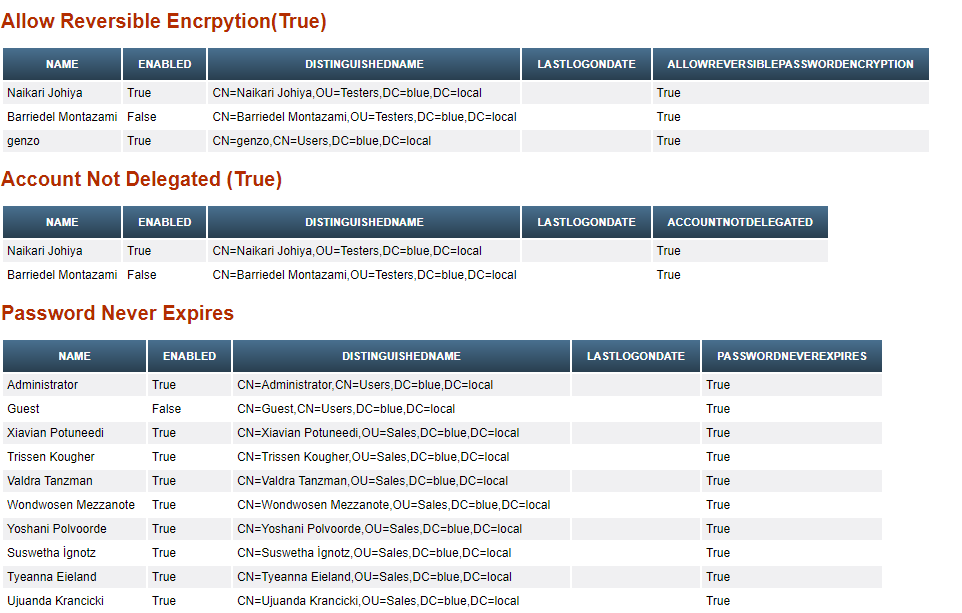
Computers raporu:
- 75 gündür aktif olmayan bilgisayarlar
- İşletim sistemi bilgileri
- Disable edilen bilgisayarlar
$inactiveComputers= Get-ADComputer -Filter {lastlogontimestamp -lt $time}  -Properties Name,OperatingSystem , lastlogontimestamp| Select Name,OperatingSystem ,@{N='lastlogontimestamp'; E={[DateTime]::FromFileTime($_.lastlogontimestamp)}}
$opSystems = Get-ADComputer -Filter "name -like '*'" -Properties operatingSystem | group -Property operatingSystem | Select Name,Count
$disabledComputers = Get-AdComputer -filter * | fl | where {$_.enabled -eq "false"} 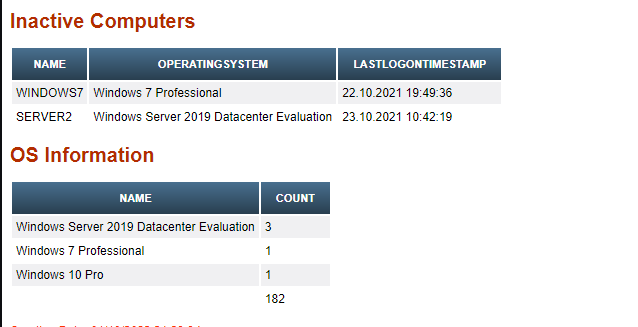
Kapatılmasında sorun olmayan servislerle ilgili rapor ekranı… Konuyla ilgili daha detaylı bilgiye bu bağlantıdan erişebilirsiniz.
$AxInstSV = Get-Service -Name AxInstSV -erroraction 'silentlycontinue' | Select-Object name,status,starttype,canshutdown
$vbthserv = Get-Service -Name vbthserv -erroraction 'silentlycontinue' | Select-Object name,status,starttype,canshutdown
$CDPUserSvc = Get-Service -Name CDPUserSvc -erroraction 'silentlycontinue' | Select-Object name,status,starttype,canshutdown
$PimIndexMaintenanceSvc = Get-Service -Name PimIndexMaintenanceSvc -erroraction 'silentlycontinue' | Select-Object name,status,starttype,canshutdown
$dmwappushservice = Get-Service -Name dmwappushservice -erroraction 'silentlycontinue' | Select-Object name,status,starttype,canshutdown
$MapsBroker = Get-Service -Name MapsBroker -erroraction 'silentlycontinue' | Select-Object name,status,starttype,canshutdown 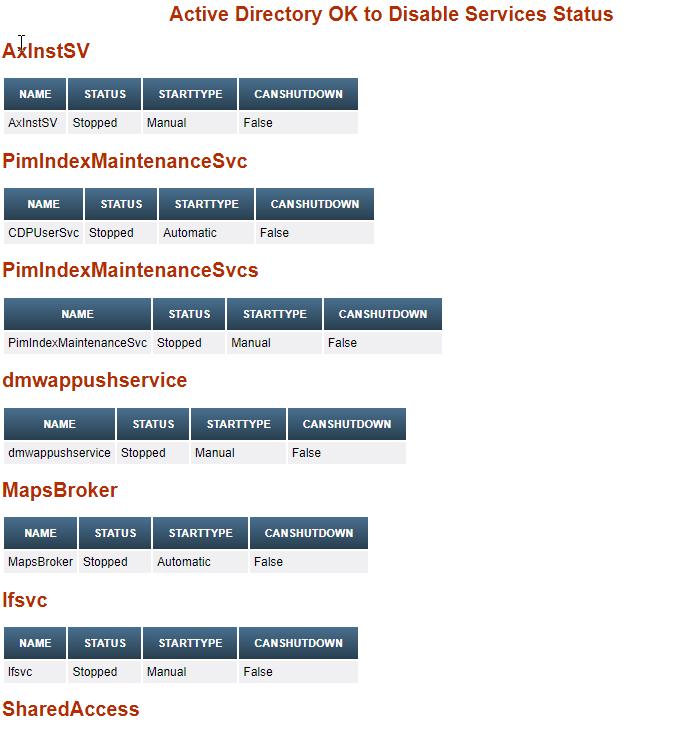
Windows Server 2012/2016 Domain Controller rolü olan sunucuda toplanması gerektiği halde toplanmayan loglar… Konuyla ilgili daha detaylı bilgi için bu bağlantıyı kullanabilirsiniz.
$securityEventList=  4618, 4649, 4719, 4765, 4766, 4794, 4897, 4964, 5124,
                       ,4621, 4675, 4692, 4693, 4706, 4713, 4714, 4715, 4716,
                       ,4724, 4727, 4735, 4737, 4739, 4754, 4755, 4764, 4780,
                       ,4816, 4865, 4866, 4867, 4868, 4870, 4882, 4885, 4890,
                       ,4892, 4896, 4906, 4907, 4908, 4912, 4960, 4961, 4962,
                       ,4963, 4965, 4976, 4977, 4978, 4983, 4984, 5027, 5028,
                       ,5029, 5030, 5035, 5037, 5038, 5120, 5121, 5122, 5123,
                       ,5376, 5377, 5453, 5480, 5483, 5484, 5485, 6145, 6273,
                       ,6274, 6275, 6276, 6277, 6278, 6279, 6280, 4608, 4609,
                       ,4610, 4611, 4612, 4614, 4615, 4616, 4624, 4625, 4634,
                       ,4647, 4648, 4656, 4657, 4658, 4660, 4661, 4662, 4663,
                       ,4672, 4673, 4674, 4688, 4689, 4690, 4691, 4696, 4697,
                       ,4698, 4699, 4700, 4701, 4702, 4704, 4705, 4707, 4717,
                       ,4718, 4720, 4722, 4723, 4725, 4726, 4728, 4729, 4730,
                       ,4731, 4732, 4733, 4734, 4738, 4740, 4741, 4742, 4743,
                       ,4744, 4745, 4746, 4747, 4748, 4749, 4750, 4751, 4752,
                       ,4753, 4756, 4757, 4758, 4759, 4760, 4761, 4762, 4767,
                       ,4768, 4769, 4770, 4771, 4772, 4774, 4775, 4776, 4778,
                       ,4779, 4781, 4783, 4785, 4786, 4787, 4788, 4789, 4790,
                       ,4869, 4871, 4872, 4873, 4874, 4875, 4876, 4877, 4878,
                       ,4879, 4880, 4881, 4883, 4884, 4886, 4887, 4888, 4889,
                       ,4891, 4893, 4894, 4895, 4898, 5136, 5137

$i=0;
foreach ($eventId in $securityEventList)
    {
      $i++
   Write-Progress -activity "Collecting event logs..." -status "Searched: $i of $($securityEventList.Count)" -percentComplete (($i / $securityEventList.Count)  * 100)
   try {
      Get-WinEvent -FilterHashTable @{LogName='Security';ID=$eventId} -ErrorAction Stop | Select-Object -First 1  | out-null
        }

     catch [Exception]
         {
            if ($_.Exception -match "No events were found that match the specified selection criteria")
           { Write-Output  $eventId >> logsNotFound.csv
 } } }
Faydalı olması dileğiyle…
Kaynaklar:
https://learn-inside.com/how-to-create-html-reports-in-powershell/
https://0xinfection.github.io/posts/wmi-ad-enum/
https://4sysops.com/archives/perform-active-directory-security-assessment-using-powershell/
https://docs.microsoft.com/en-us/windows-server/security/windows-services/security-guidelines-for-disabling-system-services-in-windows-server
https://adsecurity.org/
https://nxlog.co/documentation/nxlog-user-guide/ad-domain-controller.html
 CSEC ZONE